
Leads and Lags in Project Management
Every serious Primavera P6 schedule eventually raises the same question: “Should this be a lead, a lag, or a real activity?”
Leads and lags are powerful, but they’re also the most misused levers in schedule logic. Used well, they clarify handoffs and reflect real waiting time. Used poorly, they hide missing scope, distort float, and make your critical path untrustworthy.
This guide explains what leads and lags really are, where they help (and hurt), and how to audit them properly—especially with the DCMA 14‑Point Assessment, which ScheduleReader supports directly for P6 XER/XML schedules.
Understanding Leads and Lags
Leads (Negative Lag)
A lead is an overlap between two linked activities: it allows the successor to start (or finish) before the predecessor would normally allow under pure logic. In most tools, including P6, a lead is modeled as negative lag on a relationship.
Stop wrestling with Primavera XER schedules.
Your team can see your schedule without buying a P6 license.
Start Free Trial No credit card · Windows & Mac · From $344/yr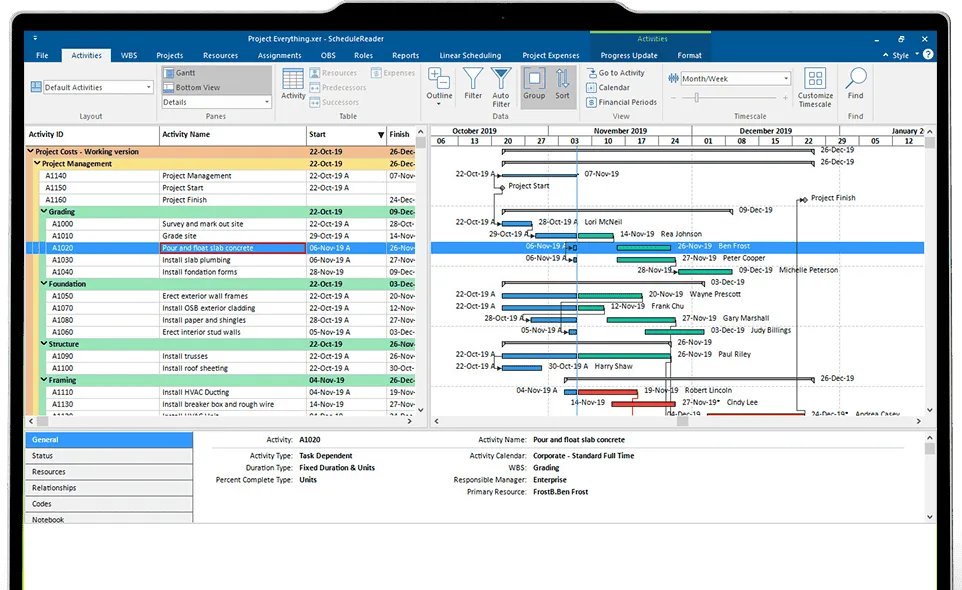
Typical uses:
- Fast‑tracking: overlapping design and construction, or commissioning and punch‑list work.
- Compressing duration without changing activity lengths.
- Accommodating known overlaps where work truly proceeds in parallel.
Example:
“Interior painting can start when 70% of plastering is complete.” In P6 this is often modeled as a Finish‑to‑Start with a negative lag (lead), or more cleanly as a Start‑to‑Start with a positive lag and proper logic.
Important caveats
- Leads can hide float and make the schedule look tighter than it really is.
- They can mask missing intermediate activities (e.g., “review”, “approval”, “curing”) that should be explicit.
- In the DCMA 14‑Point Assessment, any negative lag (lead) is a failure: the target is 0% leads. Leads are treated as logic that may distort total float and the critical path.
If you must overlap work, prefer explicit logic (SS/FF with lags, or additional activities) over negative lag on FS relationships. Document any necessary leads in the Schedule Basis Document with a clear rationale.
Lags (Positive Lag)
A lag is inserted waiting time between two activities. It represents a pause that must elapse before the successor can proceed, even though the logical dependency is satisfied.
Common, legitimate uses:
- Curing/drying times (concrete, paint, adhesives).
- Mandatory waiting periods (testing, inspections, approvals).
- Safety or regulatory delays between tasks.
Lags can be applied to FS, SS, and FF relationships in P6. They should be time‑based (days), not percentages, for clarity and easier auditing.
Example from your original text (still valid):
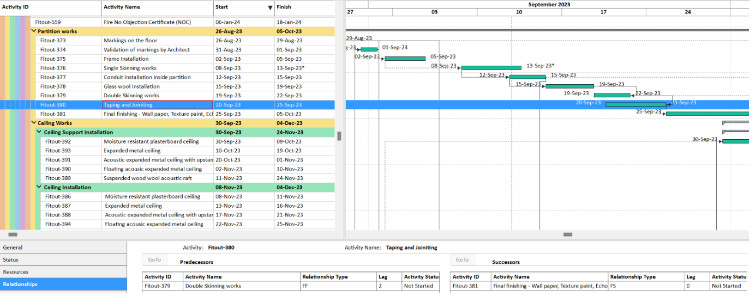
“Taping & jointing” has an FF + 2 days lag to “Double skinning works”. That means taping must finish 2 days after double skinning finishes.
Key cautions
- Lags do not progress like activities; they’re static delays. If the predecessor slips, the lag doesn’t “absorb” that slip intelligently.
- Overuse of lags often means missing activities (e.g., “QA inspection”, “Material delivery”) that should be scheduled explicitly.
- DCMA guidance: no more than 5% of relationships should have positive lags. Above that, your schedule is probably using lags as shortcuts instead of modeling real work.
Also note: lags inherit the calendar of the predecessor activity by default in P6, which can cause unexpected behavior if calendars differ across trades.
Why Overusing Leads and Lags Is Risky
Leads and lags are not “bad” by definition; the problem is over‑reliance and poor justification.
Typical risks:
- False confidence in the schedule: Overlapping activities with leads can create an illusion of an achievable timeline that collapses once real constraints appear.
- Distorted float and critical path: Negative lags especially can manipulate total float, making the critical path unreliable for decision‑making. This is exactly what the DCMA leads check targets.
- Weak forecasting: When leads/lags are used to “fix” dates instead of modeling real logic, progress updates and what‑if analyses become misleading.
- Hidden scope: Long lags (e.g., “delivery of major equipment”) should be separate activities with resources and milestones, not invisible delays.
In practice, every non‑zero lead or lag should answer:
“What real‑world constraint does this represent, and could it be modeled as an activity with duration, resources, and clear ownership?”
Auditing Leads and Lags with the DCMA 14‑Point Assessment
The DCMA 14‑Point Schedule Assessment is the de facto standard for schedule quality on large, complex, and often government‑linked projects. Two of its 14 checks focus directly on leads and lags.
DCMA Leads Check
- What it checks: Any relationship with negative lag (lead).
- Threshold: 0% — any leads mean the schedule fails this check.
- Why: Leads can break forward/backward pass logic, distort float, and hide missing dependencies.
How to fix leads
For each lead:
- Identify the predecessor/successor, relationship type, and negative offset.
- Ask: “Is this a real overlap, or missing logic/scope?”
- Replace with one of:
- An intermediate activity (e.g., “Partial handover”, “Early works package”).
- A Start‑to‑Start or Finish‑to‑Finish relationship with positive lag and clear justification.
- More granular breakdown of the predecessor so the overlap is naturally represented.
Document each change in a schedule quality log and re‑run the assessment after fixes.
DCMA Lags Check
- What it checks: Percentage of relationships with positive lag.
- Threshold: < 5% of all relationships.
- Why: Excessive lags usually mean work that should be scheduled as activities is being hidden as delays.
How to fix excessive lags
For each significant lag:
- Ask: “Does this lag represent real waiting time, or unmodeled work?”
- If it’s work (e.g., inspection, delivery, commissioning steps), create a discrete activity with:
- Duration
- Resources/roles
- Clear start/finish criteria
- Keep lags only for true waiting periods (curing, mandatory delays, fixed approvals).
A good rule of thumb: if you can name it, assign it, and track its progress, it should be an activity, not a lag.
Using ScheduleReader to Review Leads and Lags
ScheduleReader doesn’t change your P6 schedule; it gives you a fast, visual, stakeholder‑friendly view of the logic, including leads and lags, and can generate DCMA 14‑Point reports from XER/XML exports.
Practical ways it helps:
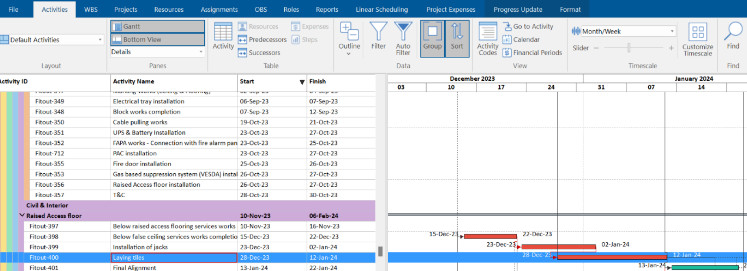
- Visualize relationships: See FS/SS/FF links with their lags/leads directly in Gantt and table views, making it easier to spot questionable overlaps or long delays.
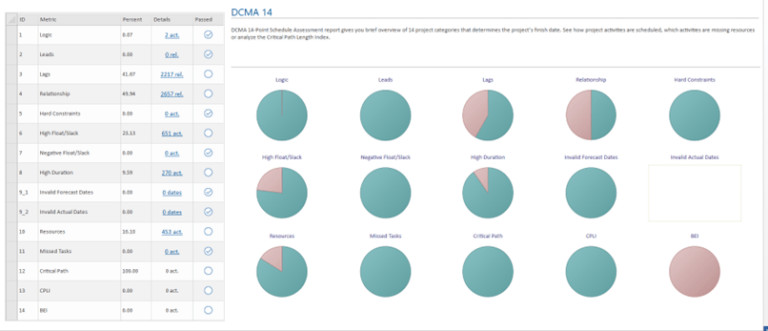
- Run DCMA 14‑Point reports: Quickly identify how many relationships have leads, how many have lags, and which activities are driving failures.
- Share with non‑P6 users: Stakeholders who don’t have P6 licenses can still review schedule quality, logic issues, and critical path implications.
Typical workflow:
- Export your P6 schedule as XER or XML.
- Open it in ScheduleReader.
- Run the DCMA 14‑Point report and filter to the Leads and Lags checks.
- Export the exception list, fix logic in P6, re‑export, and re‑validate.
This loop—export → analyze → fix → re‑run—is how mature planning teams keep their IMS (Integrated Master Schedule) defensible.
Leads and Lags – Practical Best Practices (2026)
These reflect current scheduling guidance and DCMA expectations:
- Treat every non‑zero lead/lag as suspect by default. Require a written justification in the Schedule Basis.
- Avoid negative lags (leads) on FS relationships. If you need overlap, consider:
- Breaking activities into smaller, logically overlapping pieces.
- Using SS/FF with positive lag instead of FS with negative lag.
- Use lags sparingly and only for real waiting time. Examples: curing, cooling, mandatory inspections, fixed approval windows.
- Do not use lags for long‑lead items or major deliveries. Model these as activities with duration, resources, and milestones so progress can be tracked.
- Keep lag usage under 5% of all relationships, per DCMA guidance. If you’re above that, you almost certainly have missing activities.
- Prefer time‑based lags (days) over percentage‑based ones for clarity and auditability.
- Re‑run the DCMA 14‑Point check at every baseline revision and major update, not just once at project start.
When in doubt: more explicit logic and activities, fewer leads/lags. That’s what produces schedules that survive scrutiny from clients, auditors, and your own future self.
If you’d like, I can also provide a short “before/after” snippet showing how to refactor a specific P6 relationship (e.g., FS with −5 days lead) into cleaner logic that would pass DCMA while preserving the intended overlap.