Discover How Gantt Charts Can Improve Project Timelines
A Gantt chart turns a project schedule into a visual timeline that shows activities, dates, duration, milestones, progress, and—most importantly—the relationships between work items. When the underlying schedule is sound, it helps teams understand what is happening now, what comes next, and which delays could affect the finish date.
For Primavera P6 projects, the Gantt chart is not just a presentation view. It is a practical way to review logic, explain the plan to stakeholders, monitor progress against the baseline, and spot schedule risks before they become project delays.
What Is a Gantt Chart?
A Gantt chart displays activities as horizontal bars against a calendar. Each bar shows the planned start date, finish date, and duration of an activity, while links between bars show the dependencies that determine the order of work.
Stop wrestling with Primavera XER schedules.
Your team can see your schedule without buying a P6 license.
Start Free Trial No credit card · Windows & Mac · From $344/yr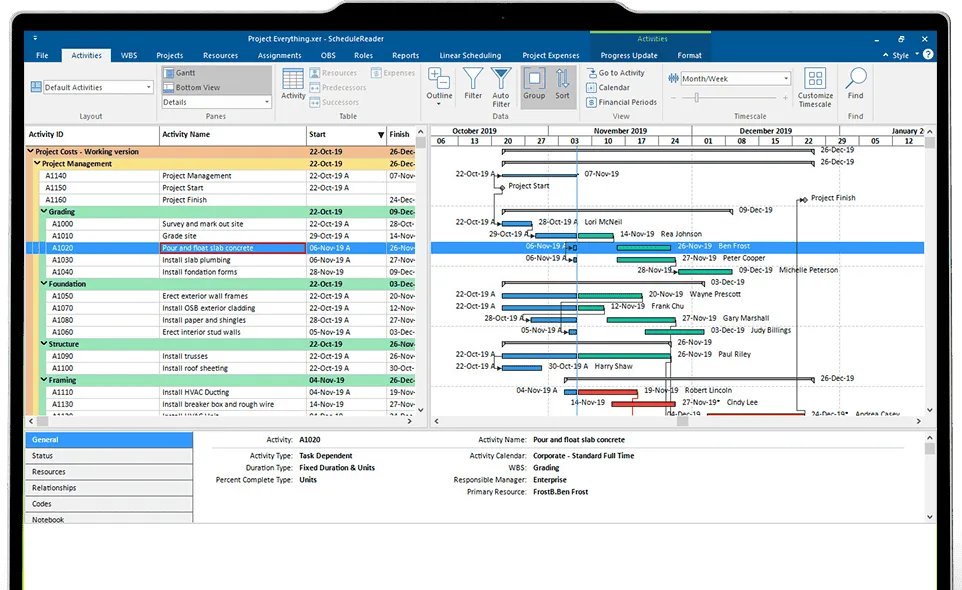
Modern Gantt charts should do more than show dates. A useful schedule view also makes milestones, critical activities, constraints, baselines, progress, and changes in the forecast easy to identify.
Core Components
A well-built Gantt chart usually includes the following elements:
| Component | What it shows | Why it matters |
|---|---|---|
| Activities | The work required to deliver the project | Breaks the scope into manageable, trackable work packages. |
| Durations | How long each activity is planned to take | Helps teams assess whether planned time is realistic. |
| Start and finish dates | When each activity is scheduled | Provides a calendar-based view of the delivery plan. |
| Dependencies | The logical relationship between activities | Allows the schedule to recalculate downstream dates when work slips. |
| Milestones | Significant events or decision points, usually with zero duration | Makes key approvals, handovers, and contractual dates visible. |
| Critical path | The sequence of activities that drives the project finish date | Focuses attention on work where delay may directly delay completion. |
| Baseline bars | The approved plan compared with the current forecast | Makes schedule drift visible instead of hiding it behind revised dates. |
| Progress data | Actual starts, actual finishes, and remaining duration | Turns the schedule from a plan into a control tool. |
How Gantt Charts Improve Timelines
Make Complex Plans Easier to Read
Large schedules can contain hundreds or thousands of activities. A Gantt chart translates that data into a visual timeline, helping project teams understand phases, handoffs, milestones, and sequencing without reading every row individually.
The most effective views are filtered for the audience. Executives may need key milestones and critical work, while discipline leads may need detailed activities, responsible teams, and near-term constraints.
Reveal Dependencies and Handoffs
A timeline without logic is only a dated task list. Dependencies show how one activity affects another, allowing the schedule to calculate downstream effects when an activity starts late, finishes late, or changes duration.
For example, if concrete works finish five days late and façade installation has a Finish-to-Start relationship with that work, a properly linked Gantt chart shows the potential impact immediately. This is far more reliable than manually changing dates in a spreadsheet.
Support Realistic Deadline Setting
Gantt charts help teams set more realistic dates when they are based on durations, logic, calendars, and available resources—not simply desired completion dates. Reviewing the entire chain of dependent work makes optimistic assumptions easier to challenge before they become delays.
This is particularly useful during baseline development, recovery planning, and change-control reviews, when project teams need to understand whether a proposed date is achievable.
Highlight the Critical Path
The critical path is the longest chain of logically connected activities that determines the earliest possible project completion date. A delay to a critical activity can delay the project finish unless the team takes corrective action.
A good Gantt chart should make critical work visible, but teams should review it regularly. The critical path can change as progress is updated, logic changes, or risks materialize.
Compare Plan With Reality
A schedule should preserve its approved baseline and show the current forecast separately. Without that comparison, teams can continually move dates and lose sight of the original commitment.
Use the Gantt view to compare:
- Baseline dates versus current forecast dates
- Planned progress versus actual progress
- Original milestones versus revised milestones
- Critical-path changes between reporting periods
- Activities that have started or finished later than planned
This makes schedule variance visible and gives stakeholders a factual basis for decisions.
Improve Communication
A Gantt chart creates a shared reference point for project managers, schedulers, site teams, clients, and executives. It helps explain what is planned, what has changed, and what decisions are needed without requiring every stakeholder to interpret raw Primavera P6 data.
For stakeholder reporting, use concise, focused layouts rather than one overloaded master chart. Show the current reporting period, key milestones, critical activities, near-term work, and material changes since the previous update.
A Gantt Chart Is Not the Schedule
A Gantt chart is only a visual representation of the underlying schedule. It cannot compensate for missing scope, incorrect durations, unrealistic resource assumptions, weak dependencies, or excessive constraints.
Common issues hidden by attractive Gantt charts include:
- Activities manually positioned with hard date constraints instead of logic
- Missing predecessor or successor relationships
- Excessive leads and lags used instead of modeling real work
- Progress updates based on percentage complete without remaining-duration review
- Baselines overwritten instead of preserved
- Critical-path activities displayed without checking whether the logic is valid
For complex projects, the Gantt chart should be reviewed alongside schedule-health checks, critical-path analysis, and a clear update process.
How to Create an Effective Gantt Chart
Follow this process to build a Gantt chart that supports real project control rather than simply reporting dates.
- Define the scope and deliverables. Start with a work breakdown structure that reflects the actual project scope, phases, disciplines, and handover points.
- Create measurable activities. Each activity should have a clear outcome, accountable owner, realistic duration, and defined completion criteria.
- Build logical relationships. Link activities using real dependencies such as Finish-to-Start, Start-to-Start, Finish-to-Finish, or Start-to-Finish where appropriate. Avoid manually setting dates whenever logic can drive the schedule.
- Assign calendars and resources. Confirm that activity calendars reflect real working time and that resource availability does not make the plan impossible to deliver.
- Add milestones. Use milestones for contractual dates, approvals, design releases, major deliveries, handovers, and completion events.
- Calculate and review the critical path. Check whether the activities driving project completion make practical sense. If they do not, investigate the schedule logic before relying on the result.
- Save an approved baseline. Once the plan is accepted, preserve it so future reports can measure performance against the original commitment.
- Update with actual data. Record actual starts, actual finishes, remaining duration, and forecast dates at a defined reporting cycle.
- Share audience-specific views. Create focused layouts for management, clients, discipline leads, and site teams instead of distributing an unreadable full-detail chart.
Best Practices for Gantt Charts
- Use dependencies, not manual date changes. Logic-driven schedules automatically show the effect of changes downstream.
- Keep the work breakdown meaningful. Too little detail hides risk; too much detail makes the chart difficult to maintain and interpret.
- Use realistic durations and calendars. A visually tidy chart is not useful if its assumptions do not match how work will actually be delivered.
- Protect the baseline. Update the forecast, not the approved plan, unless formal change control authorizes a rebaseline.
- Review the critical path at every update. Critical work can change as actual progress and forecasts change.
- Show milestones clearly. Milestones make delivery commitments and approvals easier for stakeholders to understand.
- Update to a consistent reporting date. A chart based on outdated progress creates false confidence.
- Filter before sharing. Show each stakeholder only the level of detail needed to make decisions or manage work.
- Use schedule health checks. Review missing logic, excessive constraints, long durations, leads/lags, and negative float alongside the Gantt view.
- Treat the chart as a conversation tool. Use it to identify decisions, risks, constraints, and recovery actions—not just to report that dates have changed.

Reviewing Primavera P6 Gantt Charts in ScheduleReader
ScheduleReader allows teams to open Primavera P6 XER and XML schedule files and review schedule data without requiring every stakeholder to hold a Primavera P6 license. Users can navigate Gantt views, apply filters, create layouts, trace predecessor and successor logic, review activity details, analyze schedule health, and create reports for stakeholders.
This makes it easier to run practical schedule-review meetings. A project manager can focus on the current reporting period, critical activities, upcoming milestones, delayed work, and relationship logic while keeping the complete P6 schedule available for detailed investigation.
Final Thoughts
A Gantt chart improves project timelines when it is built on credible scope, realistic durations, and complete logic. It gives project teams a clear visual framework for planning, tracking, communicating, and responding to change.
The chart itself does not prevent delay. What matters is the discipline behind it: maintaining dependencies, protecting the baseline, updating actual progress honestly, checking the critical path, and acting early when the forecast changes.