

Open Any XER File in Seconds
No P6 License Required

ScheduleReader is the fastest way to open, view, analyze, and report on Oracle Primavera P6 project schedules. Just download, install, and open your .XER file.

No credit card required · All PRO features included · Windows & Mac

Trusted By Leading Companies

Open Your XER File in 3 Simple Steps

No database connection. No Oracle license. No learning curve. Your schedule data is viewable in under 3 seconds.

1

Download ScheduleReader

Get the free 15-day trial. The installer is under 100MB and includes every PRO feature.

2

Install & Launch

Run the installer on Windows or Mac. No database setup or configuration needed.

3

Open Your .XER File

Go to File → Open, select your XER or XML file, and view your full schedule instantly.

What Is a Primavera P6 XER Project File?

An XER file is the native export format of Oracle® Primavera P6, the enterprise project management suite used across construction, engineering, oil & gas, and infrastructure industries worldwide.

Each XER file contains the complete project schedule: activities, calendars, resources, WBS structures, relationships, and cost data — stored across 20 to 66 data tables depending on project complexity.

While Primavera P6 can open these files directly, it requires an expensive Oracle license and database connection. ScheduleReader opens XER files instantly as a standalone viewer — no license, no database, no complexity.

Category

What It Contains

📋 Activities

Tasks, durations, start/finish dates, constraints

📊 WBS

Work breakdown structure hierarchy

👥 Resources

People, equipment, materials assigned to activities

📅 Calendars

Working days, holidays, shift patterns

🔗 Relationships

Predecessor/successor logic between activities

💰 Costs

Budgets, actuals, and earned value data

⚠️ Risks

Risk registers and impact assessments

The Best Way to Open XER Files

ScheduleReader is purpose-built for project teams who need fast, reliable access to Primavera P6 schedule data.

Go Beyond Just Opening the File

ScheduleReader replaces static PDF printouts with interactive, dynamic schedule analysis.
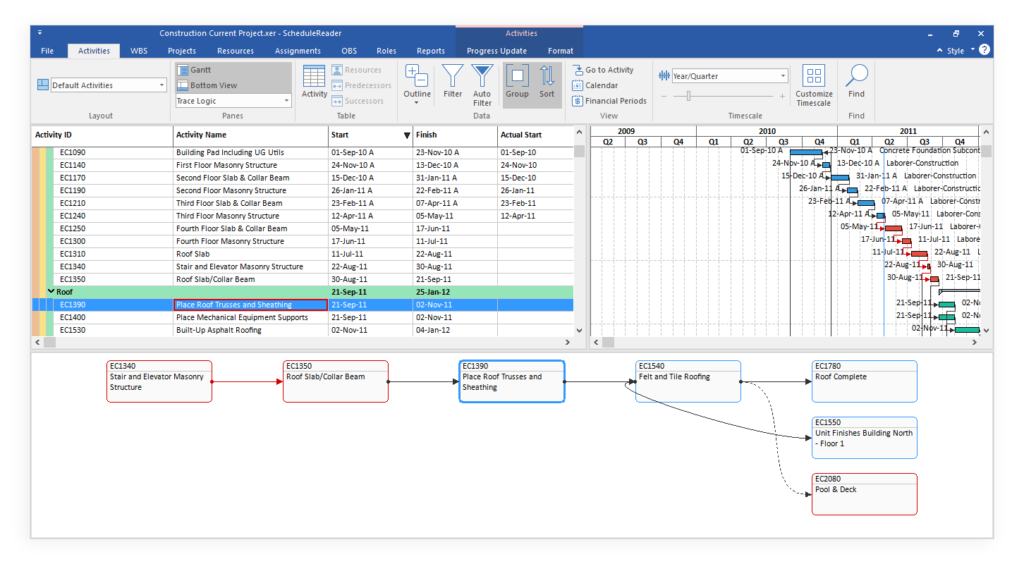
trace logic in schedule reader copy

Interactive Gantt Chart & Critical Path

Visualize your entire schedule through Activities, WBS, Resource, and Project views. Navigate relationships, track the critical path, and use Trace Logic to understand exact dependencies — without altering the original P6 file.

Progress Update: Field-to-Office Collaboration

On-site team members propose activity updates directly in ScheduleReader. Schedulers review and import structured updates back into P6 — eliminating hours of manual data entry and email chasing.
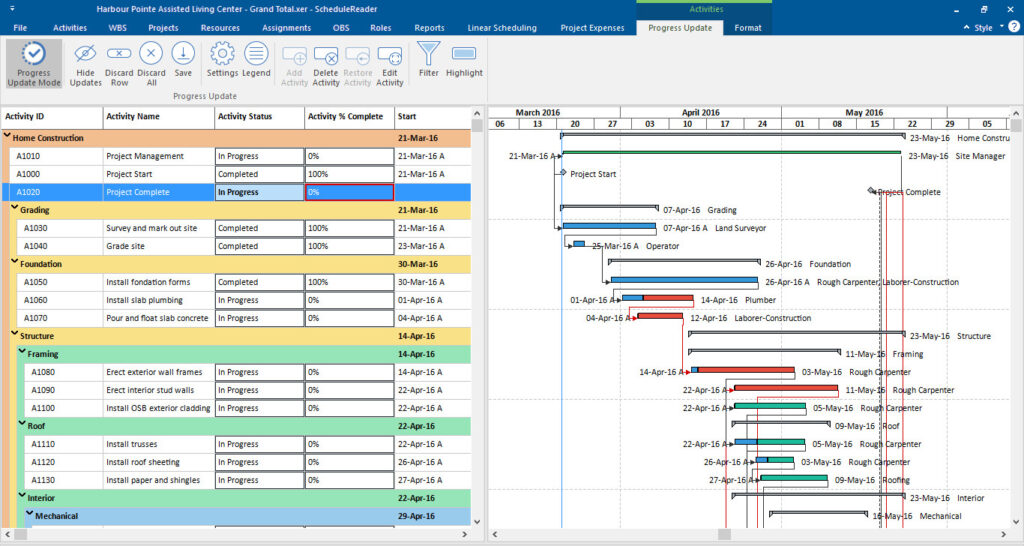
Progress Update view
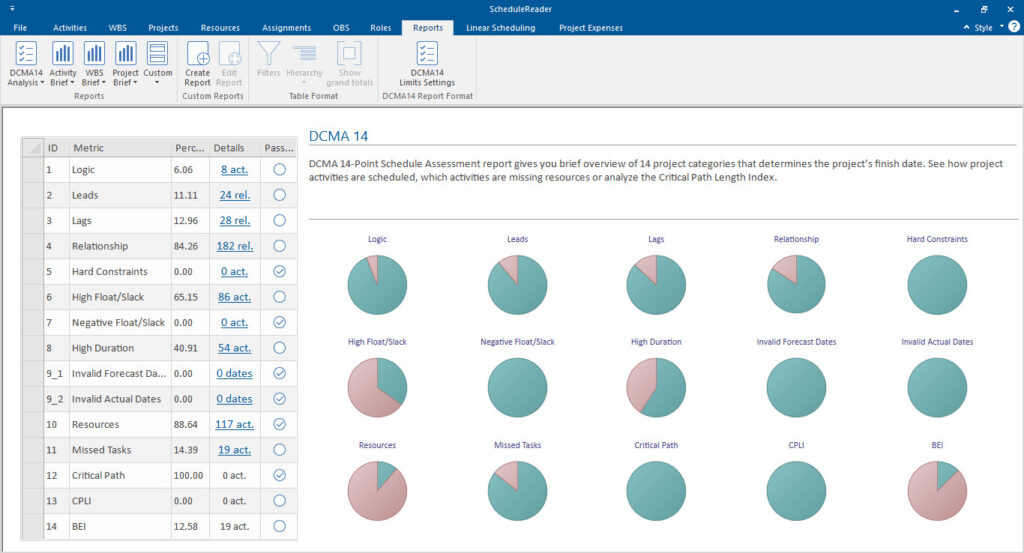
dcma 14 schedule report 1 1

DCMA 14 Schedule Health Assessment PRO

Instantly audit schedule quality against the industry-standard DCMA 14-point assessment. Identify missing logic, excessive lags, and hard constraints that jeopardize project success — presented in a clean visual dashboard.

Opening XER Files: P6 vs. ScheduleReader

See why thousands of teams choose ScheduleReader to view their Primavera schedules.

Capability

Oracle Primavera P6

ScheduleReader

Open .XER files

Open .XML files

Requires database connection

Yes

No

Requires Oracle license

Yes ($$$)

No — from $344/yr

Setup time

Hours

Under 2 minutes

Read-only (safe sharing)

No — editable

Always read-only

P6 look & feel

✓ (100% match)

Mac support

No

Yes — native app

Silent MSI deployment

Complex

Yes — Enterprise ready

Trusted by Project Professionals Worldwide

From P6 instructors to project controls managers, here’s why they chose ScheduleReader.

  • The ScheduleReader makes it possible to read Primavera XER files without an expensive Oracle license. In addition, you have the function to record and report project progress. All in the look & feel of Primavera.
    Markus Hoffer
    XPM Soft
  • I am so glad to have ScheduleReader on my laptop. Since I have been a Primavera P6 instructor for many years, I was tired of saying there was no easy way to open and view an XER file without P6. Nowadays, reviewing a giant schedule is done in seconds.
    Ilhan Bozdeniz
    Akim Engineering
  • ScheduleReader is such a useful solution for non-P6 users as it allows them to slice-and-dice P6 data with ease. It is functionally rich and provides a multitude of ways to enhance, review and report on the planner’s output.
    Mark Wrigley
    Milestone UK

Everything You Need to Know About Opening XER Files

An XER file is the native export format used by Oracle® Primavera® P6® project management software. It contains the complete project schedule data — activities, calendars, resources, WBS structures, relationships, and cost data — stored in a structured text format across 20 to 66 data tables depending on project complexity. XER files are the standard format for exchanging schedule data between P6 databases and between project stakeholders.

Download ScheduleReader, a standalone XER file viewer. Install it on Windows or Mac, then go to File → Open and select your .XER file. It opens in seconds with no database connection required and no Primavera P6 license needed. You get a full 15-day free trial with all PRO features included.

ScheduleReader offers a free 15-day trial with all PRO features included — no credit card required. After the trial, annual subscriptions start at $344/year for Standard and $440/year for PRO. Enterprise and team licensing is available for organizations that need multi-user deployment.

Yes. ScheduleReader opens both .XER and .XML files exported from Oracle Primavera P6. Both formats are fully supported with identical viewing, filtering, and reporting capabilities. Simply use File → Open and select either format.

No. ScheduleReader provides strictly read-only access to your schedule data. The original XER or XML file is never modified, ensuring data integrity at all times. This makes it safe to share with stakeholders, auditors, and field teams without risk of accidental changes.

Standard ($344/yr) includes interactive Gantt charts, views, filters, baselines, critical path analysis, trace logic, and progress updates. PRO ($440/yr) adds Reports & Dashboards (including DCMA 14 analysis), Compare Projects, Linear Scheduling View, Calendar View, and Risk module. The free trial includes all PRO features so you can evaluate everything.

Yes. ScheduleReader for Mac is a native macOS application ($324/year) that provides fast XER file viewing with an optimized Mac interface. It includes activity, WBS, resource, and role views, baseline comparison, auto-filters, and custom filtering.

Ready to Open Your XER File?

Join thousands of project professionals who replaced static PDFs for dynamic, interactive schedule analysis.
No credit card required. Includes all PRO features.