Free Float VS Total Float
This article provides and overview of free float and total float in project management and explains why project float represents an important indicator of schedule flexibility.
Understanding float begins with understanding how schedules are built and how relationships and constraints influence the calculations behind the scenes.
A planner first develops a baseline schedule which has activities and logical relationships that determine the sequence of work.
Stop wrestling with Primavera XER schedules.
Your team can see your schedule without buying a P6 license.
Start Free Trial No credit card · Windows & Mac · From $344/yr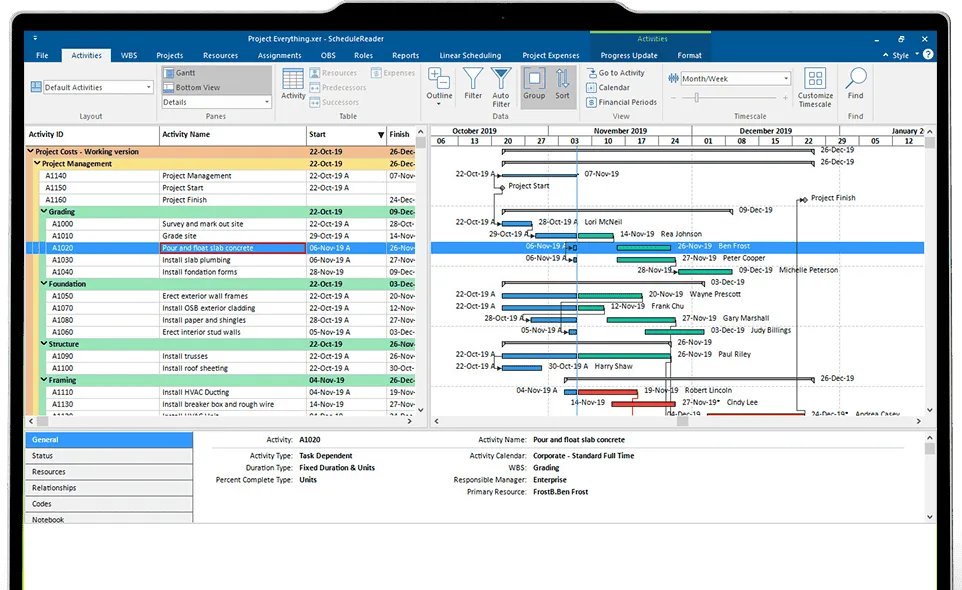
These logical relationships can be mandatory or discretionary dependencies. Mandatory or hard logic dependencies are typically associated with physical or contractual constraints. For example, you must complete foundation work before starting structural framing. On the other hand, discretionary or soft logic dependencies are the ones based on planning decisions, resource availability, or preferred execution strategies.
This structured sequencing determines how work progresses from start to finish. Once we have the logical relationship sequence applied to the schedule, project float naturally emerges.
The way float is calculated depends heavily on the type of relationships, the presence of lags/leads, and whether there are multiple predecessors or successors.
What Is Float in Project Scheduling?
Float represents the amount of time an activity can be delayed without negatively impacting the project timeline. It is a direct result of how activities are linked together and it is influenced by logic, durations, and constraints.
Because float reflects schedule flexibility, it often becomes the most contested element in delay analysis and claims management.
Several float types such as total float, free float and negative float exist.
Float (most commonly total and free float) is calculated using four fundamental schedule parameters:
- Earliest Start (ES): The earliest an activity can begin.
- Earliest Finish (EF): The earliest an activity can finish. (EF = ES + Duration)
- Latest Finish (LF): The latest an activity can finish.
- Latest Start (LS): The latest an activity can start without delaying the project. (LS = LF – Duration)
What is Total Float (Slack)?
Total float, also called slack, represents the amount of time an activity can be delayed without pushing back the project’s completion date.
Let’s look at an example where we have Activity A that runs for 5 days, followed by Activity B (4days). Activity C starts in parallel with activity A and runs for 12 days. Project finishes at Day 12 with activity C ending.
Calculation: Total float = LF (late finish) – EF (early finish) or the LS (late start) – ES (early start).
In our example we can delay the non-critical activity A and B up to 3 days (Total float) without delaying the project end date.
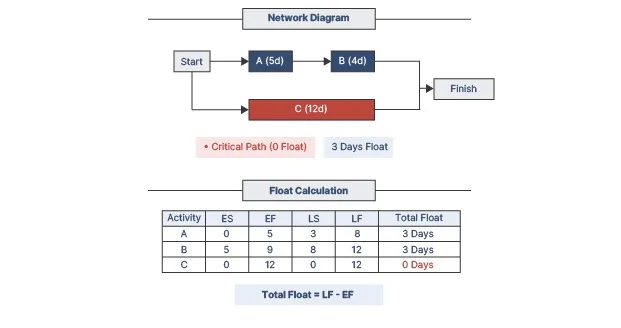
Think of it like this: on a tight deadline build, total float gives you breathing room across the entire sequence. Activities with zero total float sit on the critical path, meaning any slip here will cause the project to delay.
In P6, high total float alarms for potential issues. DCMA 14-point checks are commonly used to identify high float and negative float activities in the schedule.
What is Free Float?
Free float measures how much an activity can slip before delaying its immediate successor’s early start date.
Calculation: Early Start of successor – Early Finish of activity
For instance: We have two activities, the first pouring concrete (Activity A, 5 days) and the second activity, framing (B, 10 days). Activity B follows A.
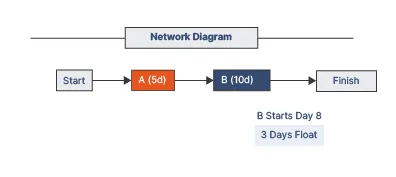
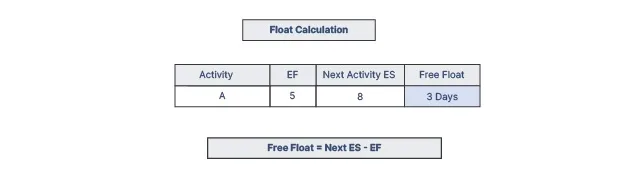
If B has another predecessor finishing later, A might have 3 days free float. Delay A by 2 days? B still starts on time. But exceed 3 days, and B shifts.
These distinctions matter in Primavera free float vs total float views. When looking at what’s critical, free float and total float should be checked together, as zero free float alone doesn’t always mean critical.
Critical Calculation Adjustments
Note: The simplified formulas presented above apply only to Finish-to-Start (FS) relationships with a single successor (1:1 relationship).
In real-world schedules, this is rarely the case.
If you have: Start-to-Start (SS) or Finish-to-Finish (FF) relationships, lags or leads applied, or multiple predecessors or successors, then the formulas must be adjusted accordingly. Ignoring this can lead to incorrect interpretation of float values.
Here’s where things get more realistic and more complex:
Different Relationship Types (SS, FF, SF)
The basic free float formula changes depending on relationship type:
- For Start-to-Start (SS): float is based on successor ES vs predecessor ES
- For Finish-to-Finish (FF): float is based on successor EF vs predecessor EF
- For Start-to-Finish (SF): rarely used, but again requires a different basis
Lags and Leads Must Be Included
If a lag or lead exists, it must be included in the calculation.
For example: (FS with lag): Free Float = ES(successor) – EF(activity) – Lag
Ignoring lag can significantly overstate available float. This is a common mistake in manual reviews.
Multiple Successors (Free Float Rule)
When an activity has multiple successors, free float is not calculated against just one.
Instead: Free Float = minimum value across all successor relationships
In other words, you include the most restrictive successor, the one that allows the least delay. This ensures that none of the successors are delayed.
Multiple Predecessors (Impact on Successors)
Similarly, when analyzing successor activities, multiple predecessors influence their early start. The successor’s ES is controlled by the latest finishing predecessor, which indirectly affects float calculations upstream.
Why Free Float and Total Float Matter
Float is more than just a number. It’s a decision-making tool.
In construction project management, float is your buffer against weather, supply snags, or labor shortages. Total float keeps the owner happy by protecting milestones, while free float lets foremen flex without scheduler alerts.
Poor float management leads to negative values which are red flags in P6, hence low float paths often need priority resources. High float on the other hand might signal dangling logic or over-optimism.
Float also helps in lookahead schedules, allowing planners to spot successor risks.
Analyzing Float in Primavera P6 Schedules
ScheduleReader provides an efficient way to analyze float in Primavera P6 schedules. The software visualizes the information from project files exported in the .xer and .xml file formats making float information to the user available right away.
There are several ways to audit float in ScheduleReader including table columns, the Gannt chart, filters and the project reports that include a DCMA 14 schedule analysis.
Audit Float Using Table Columns
The most direct way to review float is through the activity table view. All you have to do is simply add the columns for Total Float, Free Float.
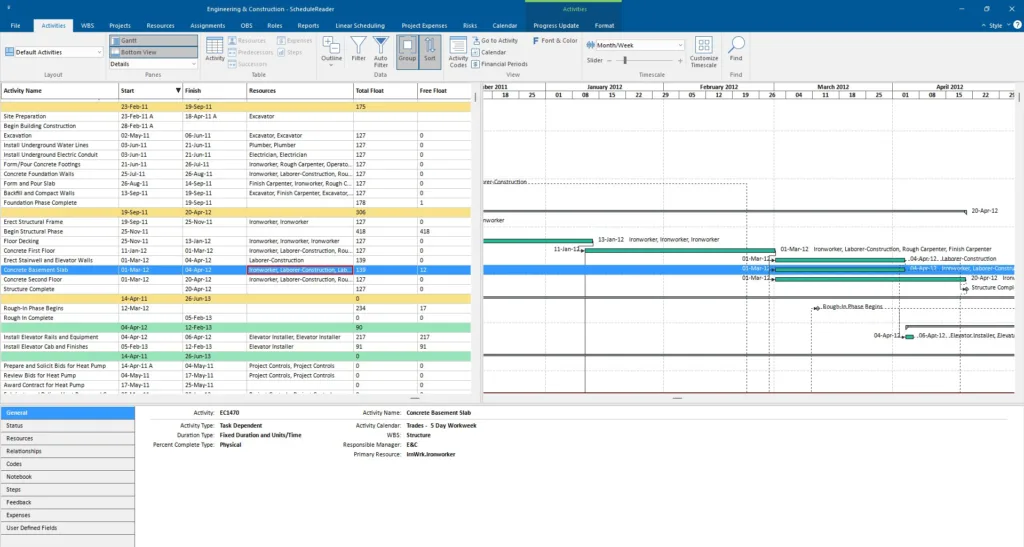
Zero float, negative float and high float values become instantly and clearly detectable, allowing you to spot delayed and critical activities and possible logic issues.
Visualize Float in the Gantt Chart
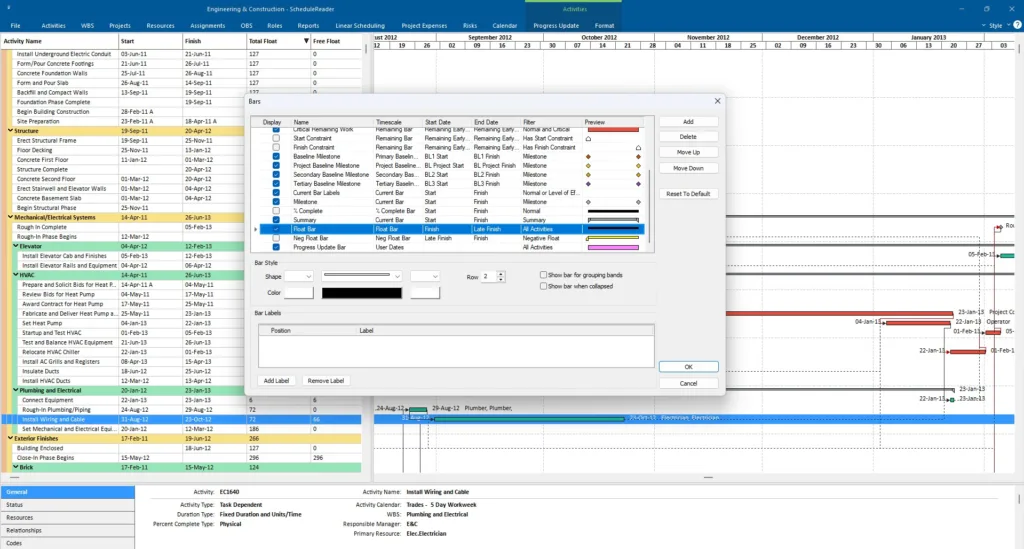
A visual review provides more context for your audit, and sometimes even allows you to get insights that are hard to detect in tables. The Gantt chart is instantly available in the Activities View on your right side of the application. To see the float, you can enable the float bar in the Bars settings of the Gantt chart.
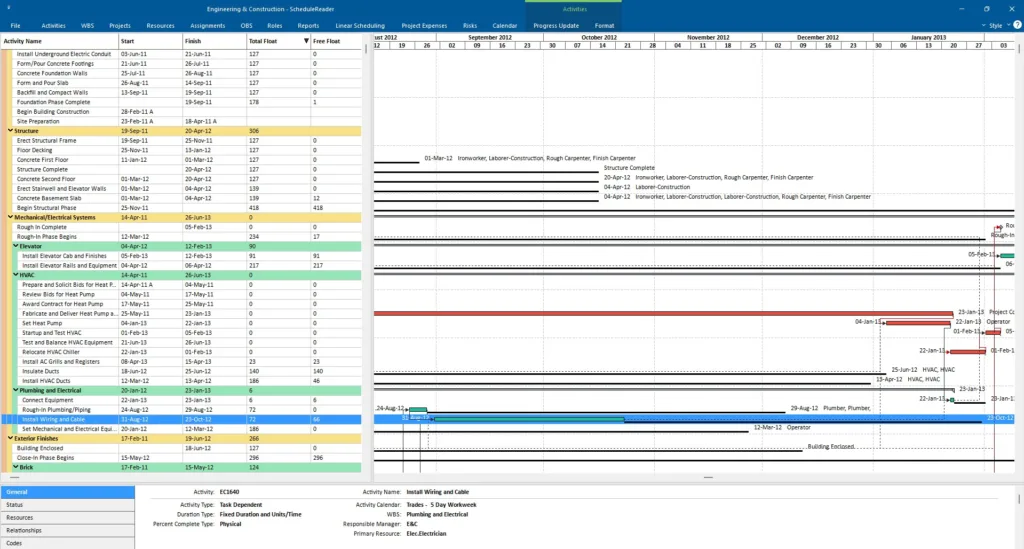
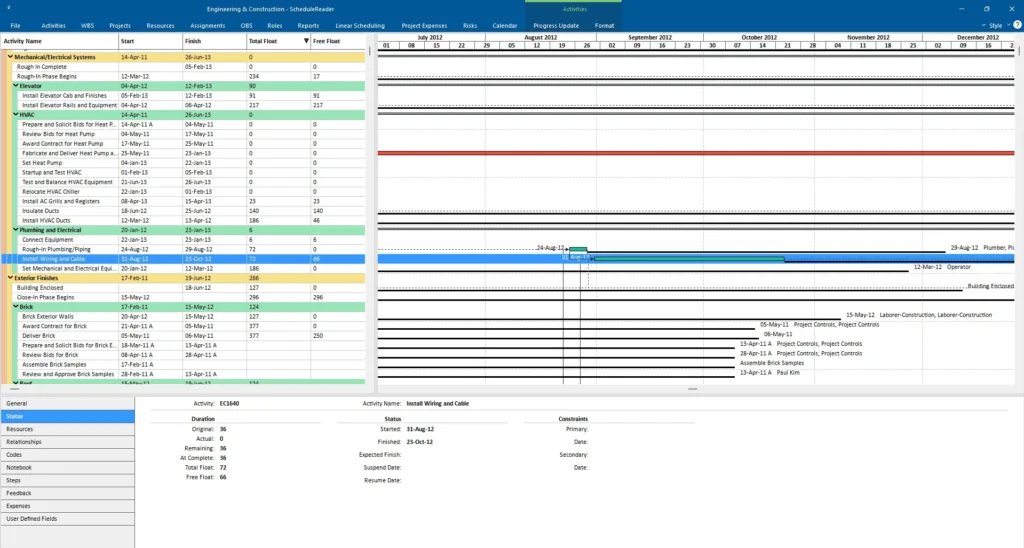
In addition to the Gantt chart, the Bottom view and its Status window can additionally help you to see the total and free float of a selected activity.
Filters
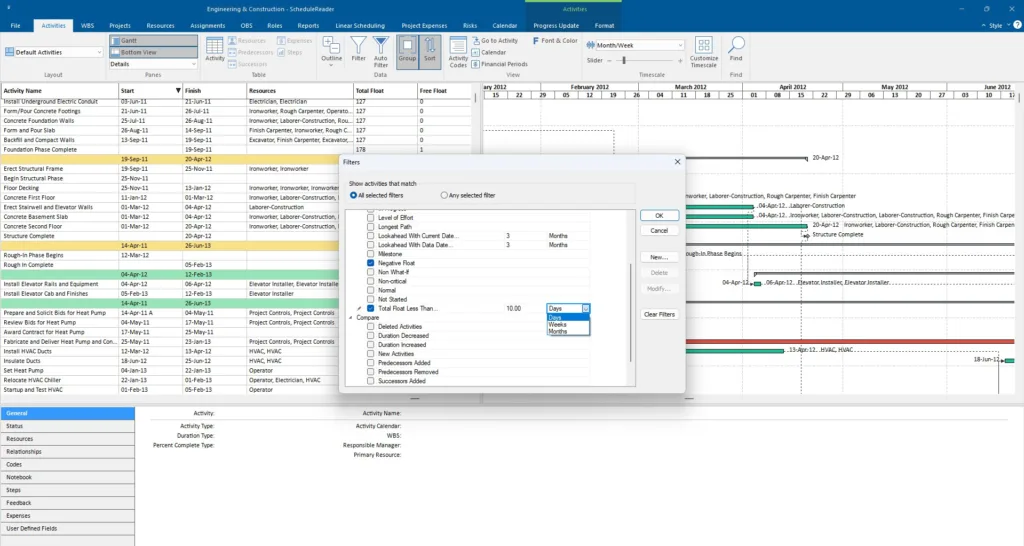
Filters help you focus on specific float conditions. You can use predefined filters (negative float and total float) or create custom ones to cut through the noise and quickly find the needed information.
Run a DCMA 14-Point Analysis – Project Reports
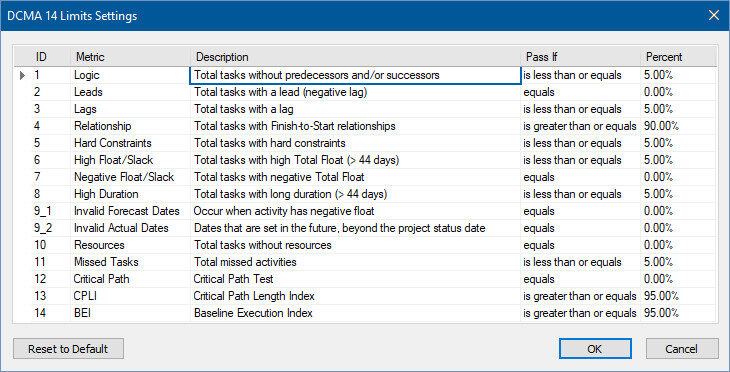
For a more formal and in-depth float audit, you can use the built-in project reports, available in the PRO version of ScheduleReader. The DCMA 14 analysis provides an industry-recognized benchmark for schedule quality, making it especially useful for reporting and internal quality assurance.

The report is instantly available with a click of a button and provides a comprehensive overview of high float (> 44 days) and negative float activities within a schedule.
Data about specific activities can be copied to Excel, and additionally, users can modify the reporting audit threshold and insert their own project-specific criteria limits. Using the formatting functionality, they can change the range criteria for all fourteen metrics.
Conclusion
Grasping free float vs total float transforms P6 scheduling from reactive to proactive. Total float guards the big picture while free float fine-tunes daily execution.
Together, they help teams understand where there is room to move, and where there isn’t.
Ready to review floats without the P6 hassle? Try ScheduleReader free for 15-days!

The Synami team is the collective voice behind Synami’s project management solutions, providing guidance, tips, and industry expertise to help teams plan, manage, and deliver projects more effectively.