How Seymour Whyte Improved Schedule Reviews and Collaboration Across Infrastructure Projects
Seymour Whyte delivers complex infrastructure and civil construction projects that require detailed planning, coordination, and schedule management.
As project schedules evolved throughout the lifecycle of major infrastructure projects, teams needed a more effective way to review updates, compare schedule versions, and collaborate around project information. Traditional processes based on spreadsheet exports, PDFs, and email communications were becoming increasingly difficult to manage and created unnecessary inefficiencies.
About Seymour Whyte
Seymour Whyte is a leading Australian civil engineering and infrastructure construction company. It was founded in 1987 and is well known for delivering complex projects, such as roads, bridges, rail, airports, and water systems.
Industry: Civil Engineering & Infrastructure Construction
Software: Primavera P6, ScheduleReader
The Challenge
One of the biggest challenges was the lack of an efficient and interactive way to review and analyse project schedules. The manual process of exporting schedules to Excel or PDF meant that critical relationships and dependencies were often lost, making it harder to assess the impact of changes.
Additionally, project teams needed a more effective way to collaborate, as feedback mechanisms were fragmented, and there was no centralised platform for real-time updates. Ensuring that all team members were working from the latest version of the project schedule was another major concern.
Project data was shared through formal correspondence such as addendum releases and email updates from lead personnel. These emails included links to updated folders containing the latest project versions. However, this method relied heavily on individual diligence to download and review the latest files, increasing the risk of misalignment if someone was working from an outdated version.
Too Much Time Spent Managing Schedule Data Outside Primavera P6
Before implementing ScheduleReader, project data was primarily managed by exporting schedules into Excel. This allowed for data manipulation and analysis, but it was a manual and time-consuming process.
Hard to Navigate Through Project Data
Filtering and structuring the data required significant effort, making it challenging to quickly extract relevant insights.
Hard to Visualize Project Logic
When schedule data was exported into Excel, important activity relationships, dependencies, and project logic were lost. Teams could see activity information, but not how tasks interacted with each other within the schedule.
Manual Version Control
Managing schedule updates relied on folder structures, naming conventions, and manually comparing multiple versions of schedules. This increased the risk of errors and made identifying project changes time-consuming.
Inefficient Collaboration
Project feedback was typically shared through:
- Comments on exported Excel spreadsheets
- Physical markup on printed PDF schedules
This method, while functional, was inefficient, as it required manual consolidation of feedback from multiple sources. The reliance on static files also introduced the risk of outdated information being used for decision-making. As a result, project teams often spent significant time consolidating comments and ensuring everyone was working from the latest version.
Limited Visibility
Without direct access to schedule information, stakeholders struggled to understand project impacts, activity relationships, and schedule changes.
Why Seymour Whyte Chose ScheduleReader
Seymour Whyte needed a solution that would allow project teams to review Primavera P6 schedules without relying on spreadsheets or disconnected reporting processes.
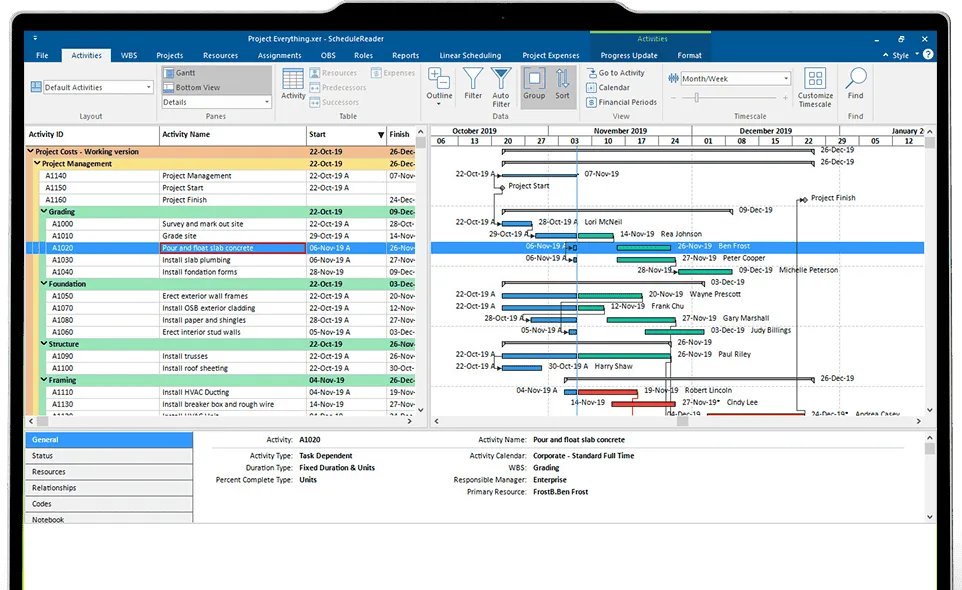
ScheduleReader provided a centralized and user-friendly environment where project teams could directly access and review schedule information while maintaining full visibility into project relationships and dependencies.
“ScheduleReader provided a more efficient and structured approach to project data management by enabling access to project schedules without the need for manual exports. Its filtering functions allow for easier navigation and a more targeted review of the programme.
Additionally, Schedule Reader preserves task dependencies, which are typically lost in Excel exports, improving visibility into project logic.
It has also enhanced team collaboration by providing a centralised platform where schedules can be accessed and reviewed without requiring extensive manual manipulation. Overall, it has helped streamline version control, facilitate more effective feedback mechanisms, and ensure all team members are working with the most up-to-date project data.” – Seppe Embrechts, National Communication & Engagement Manager
Key Results
By replacing spreadsheet-based schedule reviews with ScheduleReader, Seymour Whyte improved both efficiency and collaboration.
Direct Access to Schedule Data Without Manual Exports
Teams gained direct access to project schedules, reducing the need for manual exports while preserving important project logic and dependencies. Version control became more manageable, project feedback became easier to communicate, and stakeholders gained greater confidence that they were working from the latest information.
The result was a more structured and reliable approach to project schedule management.
- Reduced time spent reviewing schedule updates
- Improved visibility into project logic and dependencies
- Faster comparison of project schedule versions
- Better collaboration between project teams and planners
- Reduced reliance on Excel and PDF workflows
- Greater confidence in using the latest project information
- Improved communication across project stakeholders
A Better Way to Review and Communicate Schedule Information
ScheduleReader transformed how project teams interacted with Primavera P6 schedules.
Instead of exporting schedule data into spreadsheets, teams could access schedule information directly while preserving the context and relationships that drive project performance.
Preserved Activity Relationships
Unlike Excel exports, ScheduleReader maintains predecessor and successor relationships, enabling teams to understand how activities connect and how schedule changes impact the overall programme.
Improved Schedule Navigation
Features such as Expand All and Collapse All, and filters allow users to quickly navigate large Work Breakdown Structures and focus on specific project areas.
Faster Schedule Reviews
Project teams can instantly access the latest schedule information without waiting for exports, reports, or manually prepared spreadsheets.
Easier Version Comparisons
With direct access to project schedules, teams spend less time searching through folders and comparing files manually, resulting in faster schedule reviews and more informed decision-making.
Better Stakeholder Collaboration
By providing a common view of project data, ScheduleReader improves communication between planners, project managers, engineers, and delivery teams.
Stop wrestling with Primavera XER schedules.
Your team can see your schedule without buying a P6 license.
Start Free Trial No credit card · Windows & Mac · From $344/yr